Sign a PDF online
Send a contract for signature by e-mail. The signer does not need an account. The finished PDF includes a Russian or English certificate, a PAdES digital signature and an audit log. 50 ₽ per signature: from your MixMedia balance, or by Russian card / SBP right when you send — no top-up needed.
How it works
- 1Upload a PDFChoose the file on the “PDF signature” page.
- 2Place the fieldsPress Signature, Name, Date or Text, then click the spot on the page.
- 3Send for signatureEnter the signer’s name and e-mail. 50 ₽ is charged from your balance — or pay exactly 50 ₽ by Russian card / SBP right when you send.
- 4The signer signs by the linkNo registration: they draw or type a signature and pick the certificate language.
- 5Get the signed PDFThe document, certificate and audit log arrive by e-mail and appear in the list.
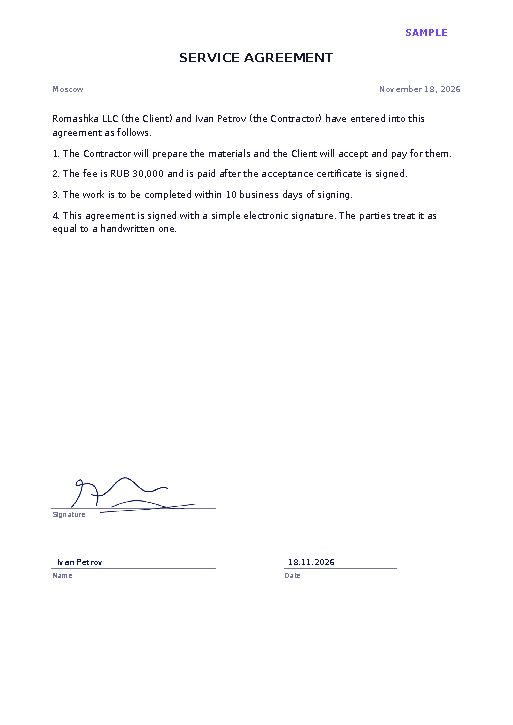
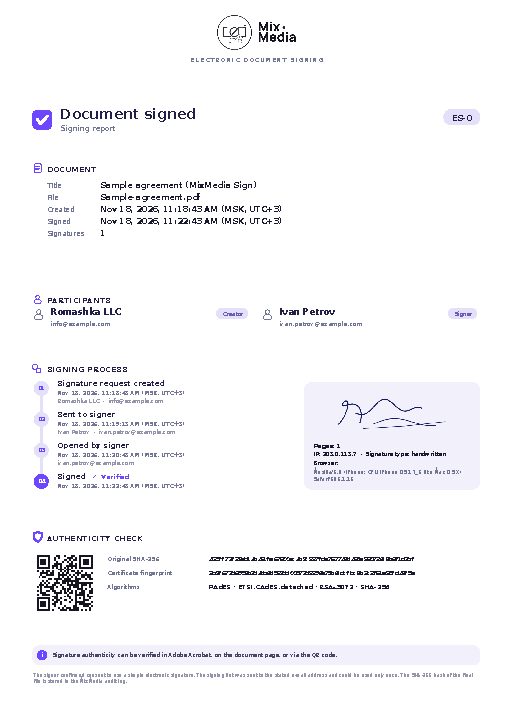
Page 1 is your document with the signature. Page 2 is the certificate with the audit log, PAdES signature and QR code.
Open the sample PDFIf the document is not signed before the link expires, or you cancel the request first, the 50 ₽ is refunded automatically.
What you get
- No login for the signer. Only a personal link in the e-mail.
- 50 ₽ per signature request. No subscription. A refund if it is not signed or you cancel in time.
- Certificate in Russian or English — the signer chooses when they sign.
- PAdES digital signature (ETSI.CAdES.detached) and an audit log: sent, opened, signed (MSK, UTC+3), IP, browser, SHA-256.
An honest limit
This is a simple electronic signature (SES / ПЭП), not a qualified electronic signature (QES / УКЭП). It does not replace a certificate from an accredited authority and is not intended for filings that legally require a qualified signature. It is meant for contracts and acts where the parties agree to sign this way.
FAQ
Is this a qualified electronic signature?
No. This is a simple electronic signature (SES / ПЭП). It is suitable when the parties agree to sign documents this way — usually that is stated in the contract. We do not issue a qualified signature (QES / УКЭП) from an accredited certificate authority.
Does the signer need an account?
No. You send them an e-mail with a personal link. They open it, sign and immediately download the finished PDF. They do not need to sign in to MixMedia.
How much does it cost to sign a PDF?
50 ₽ per signature request, charged from your MixMedia balance. If the document is not signed in time, or you cancel the request before it is signed, the amount is refunded automatically.
What language is the certificate in?
The signer chooses when they sign: Russian or English. The default is Russian. The PAdES cryptographic signature is applied in either case.
What are the PAdES signature and the audit log?
The finished PDF is sealed with a mixmedia.tech digital signature in the PAdES format (ETSI.CAdES.detached). If the file is changed afterwards, Adobe Acrobat will show the signature as invalid. The certificate and your dashboard keep the times the document was sent, opened and signed (Moscow time, UTC+3), the signer’s IP and browser, the signature method and the SHA-256 checksum.
Is this an alternative to DocuSign or SignWell in Russia?
It covers the same flow — send a contract for signature by e-mail and get a signed PDF back — without a foreign service: you pay in rubles from your MixMedia balance, 50 ₽ per signature. It is a simple electronic signature, not a qualified one.
How do I send a contract for signature?
Sign in, open “PDF signature”, upload the file, mark the signature, name or date fields on the pages and enter the signer’s e-mail. After the 50 ₽ charge they receive a letter with the link.